Langsung ke konten utama

setting IMAP GMAIL

To set up your Outlook Express client to work with Gmail:

  1. Enable IMAP in Gmail. Don't forget to click Save Changes when you're done.
  2. Open Outlook Express.
  3. Click the Tools menu, and select Accounts...
  4. Click Add, and then click Mail...
  5. Enter your name in the 'Display name' field, and click Next.
  6. Enter your full email address (username@gmail.com) in the 'Email address' field, and click Next. If you are a Google Apps user, enter your full address in the format 'username@your_domain.com.'
  7. For 'My incoming mail server is a ______ server', please select IMAP in the drop-down menu.
  8. Enter 'imap.gmail.com' in the 'Incoming mail (POP3, IMAP or HTTP) server' field. Enter 'smtp.gmail.com' in the 'Outgoing mail (SMTP) server' field.
  9. Click Next.
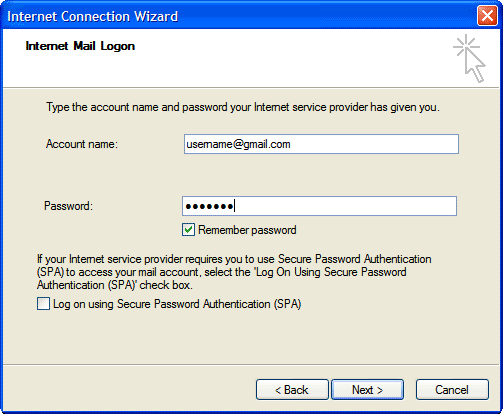
  10. Enter your full email address (including '@gmail.com' or '@your_domain.com') in the 'Account name' field. Enter your password in the 'Password' field, and click Next.
  11. configuring outlook express

  12. Click Finish.
  13. Highlight imap.gmail.com under Account, and click Properties.
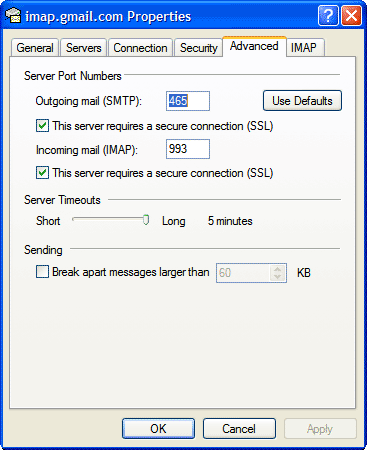
  14. Click the Advanced tab.
  15. Under Outgoing Mail (SMTP), check the box next to 'This server requires a secure connection (SSL).'
  16. Enter '465' in the 'Outgoing mail (SMTP)' field.
  17. Under Incoming mail (IMAP), check the box next to 'This server requires a secure connection (SSL)'. The port will change to '993'.
  18. configuring outlook express

  19. Click the Servers tab, and check the box next to 'My server requires authentication.'
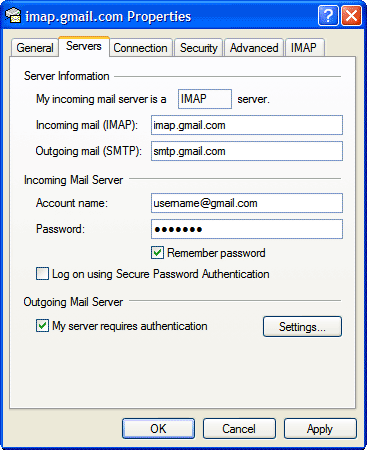
    configuring outlook express

  20. Click OK.

Komentar

Postingan populer dari blog ini

Jaringan Komputer

Apa itu Jaringan Komputer? Jaringan Komputer merupakan kumpulan dari dua atau lebih komputer yang saling terhubung dan dapat berinteraksi satu dengan yang lain. Nah kemudian dengan jaringan komputer inilah kita bisa bertukar data maupun mencetak file dengan printer yang terhubung dalam jaringan.

Setting POP 3 gmail

To set up your Outlook Express client to work with Gmail: Enable POP in your email account . Don't forget to click Save Changes when you're done. Open Outlook or Outlook Express. Click the Tools menu, and select Accounts... Click Add , and then click Mail... Enter your name in the Display name: field, and click Next . Enter your full Gmail email address (username@gmail.com) in the Email address: field, and click Next . Google Apps users, enter your full address in the format 'username@your_domain.com.' Enter pop.gmail.com in the Incoming mail (POP3, IMAP or HTTP) server: field. Enter smtp.gmail.com in the Outgoing mail (SMTP) server: field. Google Apps users, enter the server names provided; don't add your domain name in this step. Click Next . Enter your full email address (including '@gmail.com' or '@your_domain.com') in the Account name: field. Enter your email password in the Password: field, and click Next . Click Finish . ...

Encapsulation ppp di router cisco

PPP sendiri adalah satu teknologi jaringan WAN, yang berfungsi menghubungkan antar jaringan LAN dengan lingkup geografis yang berbeda. Secara default semua router cisco menggunakan enkapsulasi HDLC untuk interface serialnya. Kalau vendor selain cisco, HDLCnya berbeda-beda, oleh sebab itu kita pakai encapsulation PPP (point to point protocol) yang merupakan standard umum yang dipakai oleh semua vendor. PPP juga dilengkapi dengan authentication dan merupakan independent protocol, sehingga dapat berjalan di protocol IP, IPX dan protocol layer tiga lainnya. Jadi untuk menghubungkan router dari cisco dan non cisco kita menggunakan encapsulation PPP. Nah untuk encapsulation di PPP memiliki 2 autentikasi, yaitu : 1. autentikasi pap (password authentication protocol) 2. autentikasi chap (challenge handshake authentication protocol) perbedaan keduanya adalah, password pada autentikasi pap dikirim dalam bentuk clear text, sehingga bisa disadap oleh pihak ketiga. Sedangkan autentikasi dengan cha...